 DSI Founding
Mission Supporter

Licensed
& Operated
What did compliance earn your MSP last month?
CYBERWHITE turns Essential 8 and SMB1001 into a service you sell.
By hand, one Essential 8 assessment takes 45 to 62 hours. CYBERWHITE scans a client tenant in about five minutes. CARS ranks the gaps, AutoFix deploys the fixes, and the evidence is ready when the insurer asks.
We deploy the fix, not just the report.
Moving clients to SMB1001 Gold? See how MSPs deliver it as a service line.
Cancel anytime · No contract · Working in 15 minutes
Founding Program open: founding MSPs get a direct line to the founder and real influence on the roadmap. What we are, and what we are not
The Founding Program closes 31 December 2026. Join before 31 December 2026 and your plan price stays fixed for as long as you stay subscribed. New capabilities are included. From 1 January 2027 they are paid add-ons for new customers. See what founding members get
Most MSPs already do the security work. Few of them bill for it.
Tenders, insurers and enterprise customers keep asking your clients to prove their security. Most clients ignore the ask, or pay someone else to answer it.
MSPs rarely sell this service for one reason. By hand, it costs more to deliver than you can charge.
Automation flips that. The scan does the evidence work. Compliance becomes a monthly service you price and keep.
And the client stays. Their compliance history lives with you, not with the MSP who is $10 cheaper.
The Four Things Costing You Margin and Clients
Every MSP delivering compliance hits the same four walls. Here is each one, and how CYBERWHITE takes it off your plate.
Clients walk without compliance proof
Your clients lose tenders and insurance renewals without Essential 8 ML2 evidence. If you can't deliver it, they move to an MSP who can.
CYBERWHITE
Auditor-ready evidence across five frameworks, generated from a single scan, ready to hand to the client.
Too many findings, no idea what to fix first
Every tenant's Secure Score throws 80+ recommendations. Azure adds 40 more. Across a portfolio that is thousands of findings with no priority.
CARS, proprietary
Ranks every gap by business context, severity, and cross-framework impact. One prioritised queue per client. Fix what matters, not what is easiest.
Controls drift back between assessments
You got the client to ML2 last quarter. Settings changed, exceptions piled up, and by the next review they were back to ML1. Nobody noticed until the auditor did.
CYBERWHITE
AutoFix deploys an enforced policy that stays in the tenant and keeps holding the control. Verify it on any re-scan, with snapshot and rollback.
Manual assessments eat the hours you bill
A manual ML2 assessment runs 45 to 62 hours per client. Across 20 tenants that is over 1,000 hours a cycle, straight off your margin.
CYBERWHITE
Scans in about 5 minutes per tenant. The same team delivers more compliance work without adding headcount.
How It Works
Connect Client Tenants
Securely connect your clients' M365 environments using OAuth. Nothing to install on client devices. Scanning is read-only, and any AutoFix deployment is snapshot-protected, review-gated, and one-click reversible.
Run Compliance Scans
Automated scanning against Essential 8, SMB1001, or SOC 2 controls. See gaps and compliance status instantly.
Review Findings
Use prioritised actions and remediation guidance to plan and address compliance gaps for each client.
Deliver Reports
Generate client-ready compliance reports showing current status, gaps, and recommended actions.
The Essential Eight is being retired. The asks are not.
ASD is replacing the Essential Eight with a new Essentials series. Read ASD's announcement. ASD says work done under the Essential Eight stays relevant.
When the framework changes, every client needs re-baselining. On spreadsheets, that is weeks of unpaid rework. On CYBERWHITE, it is a re-scan.
We already run Essential 8, SMB1001, SOC 2 and NIST CSF 2.0 side by side. Essentials support will follow ASD's releases. You sell the service. We track the framework.
The stated timeline
- NowConsultation open on the first chapter, Essentials for enterprise IT
- Year 1Essential Eight deprecation expected to begin
- Year 2Essential Eight retired, replaced by the Essentials series
Timeline per ACSC's head of cyber security resilience, as reported by iTnews. Consultation details from ASD.
See What Your Team Fixes First
One prioritised queue per client. CARS ranks every gap by business risk, so your team works the critical controls first, with framework mapping and remediation built in.
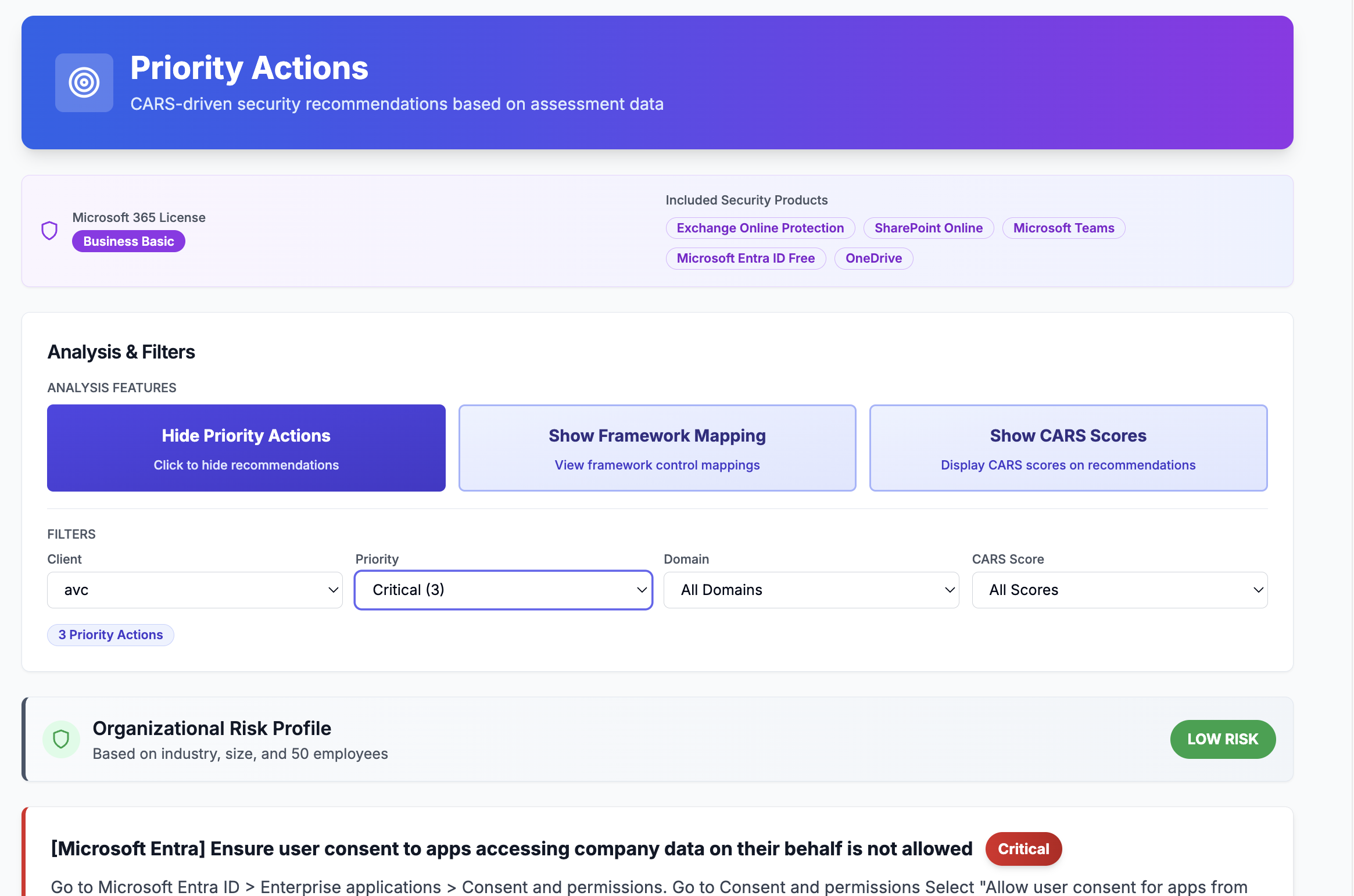
CARS-driven priority actions, ranked by business risk across a client tenant.
Whatever Framework the Ask Names, You Can Answer It
A tender wants Essential 8. An insurer wants SMB1001. An enterprise customer wants SOC 2. One platform, one scan per client, every answer.
Essential 8
ACSC's Essential 8 mitigation strategies. Automated ML1-ML2 assessment.
SMB1001
Australian cybersecurity certification for SMBs. Structured assessments.
NIST CSF 2.0
International framework for US clients or global compliance requirements.
SOC 2
For clients selling to US markets. SOC 2 readiness assessment.
AutoFix deploys the fix. Your team bills the work.
Drata and Vanta hand your clients a report and walk away. CYBERWHITE pushes verified Microsoft Graph policies into each client tenant, with snapshot, rollback, and audit trail. Your clients pay you to discover + deploy + verify. We do the technical work; you keep the relationship and the margin.
One-click Graph fixes
151 remediation actions mapped across E8 ML1, E8 ML2, SMB1001 and SOC 2. 48 of the highest-impact controls deploy into the tenant in one click. Snapshot first, deploy, roll back in one click, and re-scan any time to confirm the control holds. The rest we scan, licence-check, or track as attestations.
From scan to deployed
Connect the client M365 tenant via OAuth. Scan finishes in 5 minutes. Deploy report-only policies for review, then enforce when client approves.
Rollback if needed
Every action takes a snapshot before deploying. If a client complains, restore in one click. Your clients trust you with admin access because nothing is permanent.
Get 60+ engineer-hours back per tenant, per cycle
Manual Essential 8 work quietly eats your margin. A full ML2 cycle by hand, assess all 107 controls, deploy the fixes, and produce the evidence, is roughly 60 to 75 engineer-hours per client tenant. With CYBERWHITE it is a five-minute scan, then about an hour to review and approve the one-click fixes. That is time you bill, or time you spend winning the next client.
back per ML1 cycle, per tenant
back per ML2 cycle, per tenant
of that is deploying the fixes
Based on 25 to 35 minutes per control to assess manually, and Microsoft's own documented Conditional Access procedure (about 45 minutes per policy) for the one-click fixes. Deploy time is measured from our production logs. Indicative estimate, not a quote.
What MSPs actually sell
Discovery
Bill for scanning and reporting on the client's current E8 / SMB1001 posture.
Deployment
Bill for reviewing AutoFix recommendations, approving deployment, and verifying the client's new posture.
Audit prep
Bill for exporting evidence packages, walking clients through their certification, and answering auditor questions.
Keep CIPP. It hardens the tenant. We prove the tenant meets the standard.
If you run CIPP, keep it. It is excellent at tenant admin and baselines. It does not map those settings to Essential 8, SMB1001, SOC 2 or NIST. It does not produce the evidence pack insurers and auditors ask for. That part is billable. That part is CYBERWHITE.
Your admin tooling
CIPP, RMM, PSA. Tenant administration, configuration standards, day-to-day operations. Keep all of it. CYBERWHITE replaces none of it.
CYBERWHITE
Framework-mapped scanning, CARS-ranked priorities, one-click policy deployment with snapshot and rollback, and dated evidence per control, per client. The billable compliance layer.
Together
Harden with the tools you already run. Prove it against the frameworks with CYBERWHITE, and hand the client the evidence pack their insurer asks for.
Manual Essential 8 and SMB1001 assessment takes hours per client. CYBERWHITE takes minutes.
Assessing one client manually means logging into admin portals, comparing each configuration against the framework, recording the gaps, and capturing evidence. CYBERWHITE automates that assessment step. See what the assessment costs today, and what automation gives back.
MSP details
Drag any slider. Results update live.
107 control checks at this level
How this is calculated. We estimate 25 to 35 minutes to manually assess and evidence each control (admin portal check, comparison against the framework, recording the gap, capturing evidence). This is our estimate, not an official figure, so adjust it to your own experience. It covers the assessment step only. CYBERWHITE's automated scan completes in roughly 5 to 10 minutes per tenant. The one-click fix deployment is counted separately, in its own card on the right, not mixed into this assessment figure. An assessment cycle is one full round of assessing every client; most MSPs run one each quarter.
Per client. Essential 8 ML2. Manual assessment.
Total assessment hours across 20 clients
Time to assess every client manually
Assessment time saved with CYBERWHITE
A cycle is one full round of assessing every client (most MSPs run one each quarter). This figure is assessment and evidence-gathering only. The one-click fix deployment saving is shown separately, below.
Plus: one-click fix deployment
Deploying one policy by hand is roughly 45 minutes, based on Microsoft's own documented Conditional Access procedure. CYBERWHITE deploys in one click (about 3 seconds, measured), so call it 2 minutes with review and approve.
Why 25 to 35 minutes per control? How we calculate assessment time
This calculator estimates the time to manually assess and evidence one control, not to fix it. Assessing a single control properly usually means:
- Opening the relevant admin portal or console
- Finding the setting and comparing it against the framework requirement
- Deciding whether it is compliant, partial, or a gap
- Recording the finding
- Capturing evidence (a screenshot or configuration export) for the audit trail
Done thoroughly, that is 25 to 35 minutes per control for most teams, with a 30-minute midpoint. Experienced engineers batching similar controls across tenants may be faster. Complex or evidence-heavy controls take longer. That is why we show a range and let you adjust every input to your own numbers.
The per-control time is our own estimate, not a government statistic. The control counts are real platform figures: Essential 8 ML1 (48) and ML2 (107) checks, and SMB1001 cumulative tiers from Bronze (7) to Diamond (39). The one-click fix deployment time is shown separately in the results, not folded into this assessment estimate.
What CYBERWHITE is not
- ·Not an RMM, PSA or EDR. Keep your stack. We sit beside it as the compliance layer.
- ·Not a report-only GRC tool. We deploy the fix, not just the report.
- ·SOC 2 combines a guided assessment with Azure and GitHub scanning. It is not a fully automated audit, and no honest tool is.
- ·Essential 8 ML3 automation is on the roadmap, not live. Continuous compliance monitoring is in development.
- ·Every number on this page comes from the platform, not a brochure. Check them on your own tenant with the free assessment.